








Fix account being disabled after adding a card that doesnt hold funds successfully
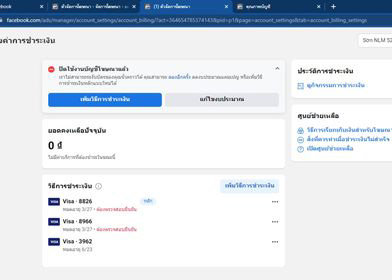
Fix account being disabled after adding a card that doesnt hold funds successfully
Instructions to fix errors after adding tags: Due to abnormal activity detected, we have disabled your ad account. Verify your account to run ads again.
How to fix error after Add tag: Detected unusual activity, so we disabled your ad account. Verify your account to run ads again.
Step 1: Replace the advertising account ID (ADS ID) into xxxxxxxxxxx on the link below and paste it into the browser to log in to Facebook holding the ad account.
Step 2: Click Approve - Done.
Step 3: Go back to the payment settings page and press F5, Facebook will pass an error that cannot hold an amount with your card.
Step 4: Set up your ad campaign normally with an initial budget of about 100,000 - 150,000 VND and pay by hand as soon as Facebook starts spending money.
After the manual payment is done and the refresh is received, the error that cannot be held in Step 3 will disappear. If it does not disappear, select the word retry above the error message line.
Wish you have a good experience, Thank you.
New posts