








How to safely change your Facebook account password
How to safely change your Facebook account password
Hello friends, today I show you how to change your Facebook account password 100% Without Check Point, when you buy an account you need to change your password if you do it normally, it is very easy to be locked by Check Point. permanent account, please read next for specific instructions. Very easy.
Change Password Via Facebook Without Check Point
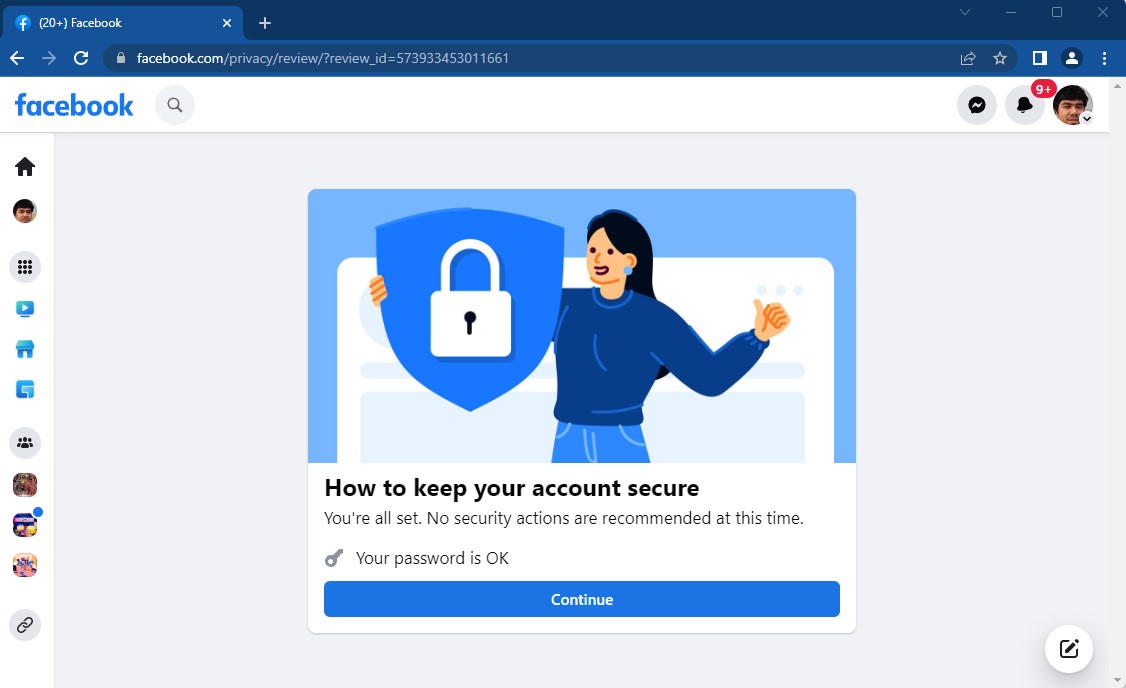
Step 1: The first thing you need to do is access the link below.
https://www.facebook.com/privacy/review/?review_id=573933453011661
Step 2: A message screen will appear as shown "You're all set. No security actions are recommended at this time.." Then click "continue".

Step 3: After clicking Continue, the screen takes you to the next form where you click “Change Password”.

Step 4: Enter the old password and enter the new password in the box as shown.

Step 5: You click "change password" and press "next" continuously the next steps are done
New posts


Most viewed
- How to Log In Facebook Account (Updated 2025) 31,036
- How to buy accounts on Accmoon ? Step-by-step instructions 10,759
- Solution to fix disabled account after adding payment 10,290
- Fix account being disabled after adding a card that doesnt hold funds successfully 8,365
- Account disabled (Error 792) after adding payment card 6,479